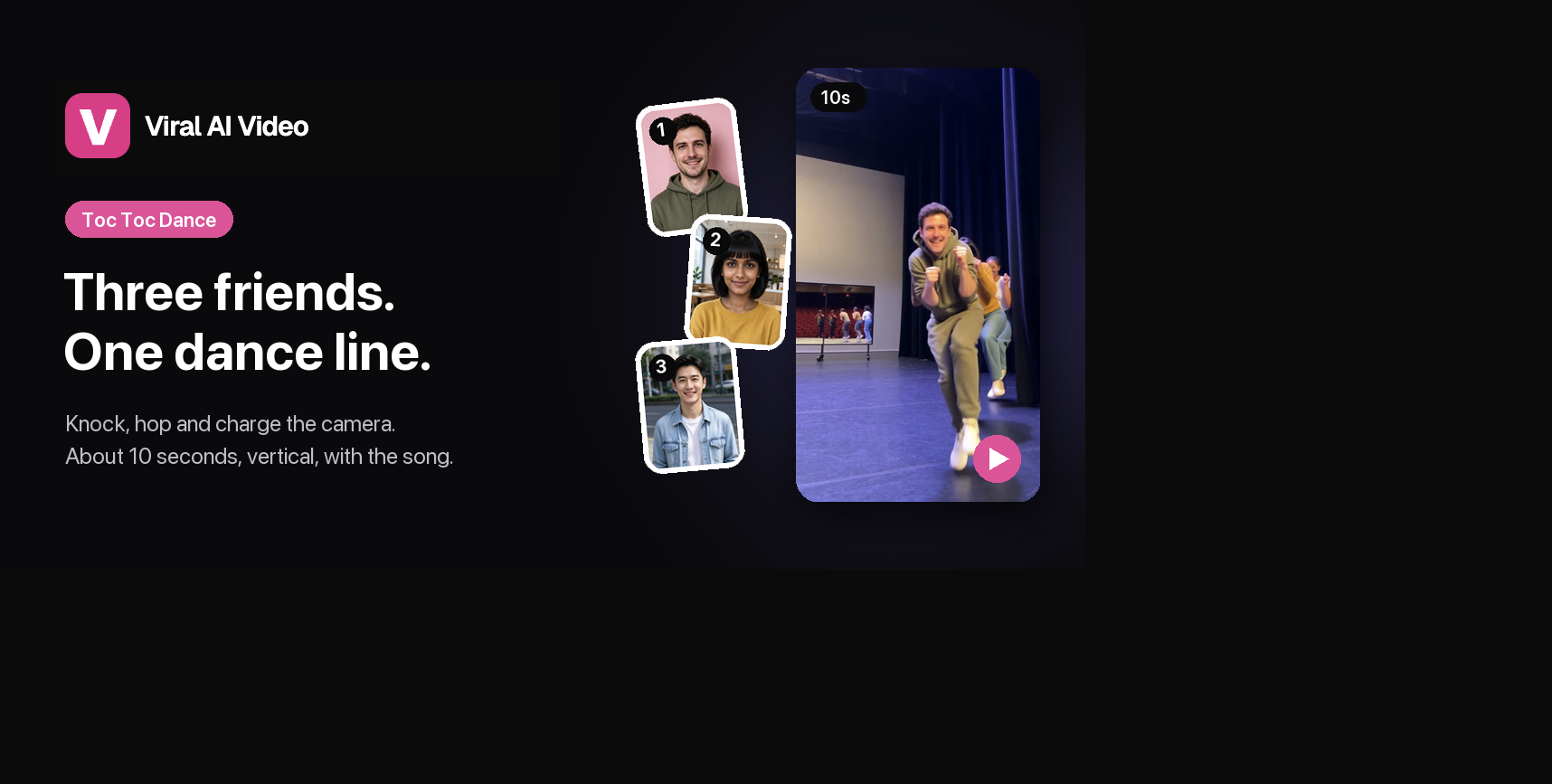
Fists knocking at the chest, knees up, little hops on one foot, and a whole line of people charging the camera one by one. That's the Toc Toc dance, and its AI version is everywhere on TikTok and Reels right now. Here's what it is, where it comes from, and how to put yourself and your friends at the front of the line.
Made with Viral AI Video from three AI sample photos. Photo 1 leads the line, photos 2 and 3 follow.
What is the Toc Toc dance trend?
The Toc Toc dance is built around one move you recognize in a second: both fists pumping in front of the chest, as if knocking on a door, while you hop on one foot with your knees up. It's simple, a little silly and very easy to copy, which is exactly why it spread.
The version this template recreates is the group one: dancers line up on a stage and run at the camera one at a time. Each one grabs about a second of close-up, pulls a face, and leaves the frame so the next can take over. Halfway through, the line comes round for a second lap.
People use it for:
- Friend groups: everyone gets their second of fame.
- Teams and classes: a fun intro for a new project or the last day of term.
- Solo flexes: lead the line yourself and let the background dancers follow.
What song is the Toc Toc dance?
The trend is set to "Toc Toc", a French party song associated with Patrick Sébastien. On TikTok and Reels the clips usually carry #toctoc, often alongside #jeanphildance and #aidance. Viral AI Video is an independent tool and is not affiliated with the artist or the original creators: the template only borrows the choreography, staging and timing.
How many photos do you need?
One is enough. The template has three places at the front of the line, and you fill as many as you like:
| Photos | Who's in the video |
|---|---|
| 1 | You lead the line and come back on the second lap. Every other place goes to background dancers. |
| 2 | Photo 1 leads, photo 2 is second, and both come back on the second lap. |
| 3 | Photo 1 leads, photo 2 is second, photo 3 is third, and photos 2 and 3 come back on the second lap. |
The price is the same whichever you choose.
How to make the Toc Toc AI dance video
- Open the Toc Toc template.
- Add one to three photos. Photo 1 leads the line; photos 2 and 3 are optional. One person per photo, face sharp and front-facing. You don't need a prompt.
- Pick a quality and generate. Photos are reviewed first, then the render takes a few minutes. The clip is about 10 seconds in 9:16. If a photo isn't approved or the render fails, the credits come back automatically.
- Download or share. The video comes with the song, synced to the picture. On a phone you can send it straight to TikTok, Reels or Shorts.
What the template recreates
| Time | Beat |
|---|---|
| 0–1.2 s | Photo 1 opens from the back of the stage and is first to charge the camera |
| 1.2–2.9 s | Photos 2 and 3 follow right behind; photo 3 gets the big surprised face |
| 2.9–6.3 s | The rest of the line runs past, one dancer at a time |
| 6.3–7.8 s | Second lap: your friends come back for another close-up |
| 7.8–10 s | The line keeps coming and the last dancer finishes with both arms up |
The theater stage, the blue stage lights and the moves come with the template. Faces, hair and outfits follow your photos.
Photo tips
- Sharp and front-facing. Everyone runs right up to the lens, so a clear face pays off.
- Hair you like. Each photo's hairstyle is kept in the video, down to length, curl and color.
- Bright clothes. Whatever you wear in the photo, you wear on stage, and color stands out against the dark curtains.
- Funniest friend in photo 3. That place gets the biggest close-up face.
- Use your own photos, or friends who agreed to it. Celebrity photos and film or music video stills won't pass review.
Is it free? What does it cost?
Signing up, uploading and watching the sample are free. Each render costs credits: Premium is 20 for 480p, 40 for 720p and 70 for 1080p, and the Balanced version of the same ~10-second clip starts at 10 credits. The song is included and there's no watermark. It's one of the most affordable templates on the site, and credit packs don't need a subscription.
Toc Toc CapCut template vs this template
"Toc Toc" templates are shared on TikTok as CapCut "Pioneer" templates — you open them in the app and add your media. They're free, and what you get depends on the template. This template puts one to three of your friends at the front of the dance line on the original stage, charging the camera and coming back for a second lap, with the song, from photos in any browser. It starts at 10 credits.
Caption ideas
- "Us arriving at the party like"
- "The group chat when someone says 'I'm outside'"
- "POV: it's Friday and nobody has plans"
- "Knock knock. It's us."
Add #TocToc and #TocTocDance so people following the trend can find it.
More templates to try
Make your Toc Toc dance video →
One to three photos, about 10 seconds, vertical, with the song.
Gas Station Dance →
Three friends: an opening dance, a sunset selfie and a sports-car entrance.
Rumpelstiltskin AI →
A shush, a sly grin and a tiptoe dance in a hay-filled barn, for two.
Burning Bridges AI →
One photo, Drake's "Where she at?" party under the chandeliers.
Want to see what else is trending? Read our AI video trends roundup.
Read more
Can I Ride Dance: The Song, the Steps and How the TikTok Trend Started
Everything about the Can I Ride dance: the SIDEPIECE and 95 South song, who made the choreography, the routine count by count, why it took off in October 2026 — and how to make your own version from two photos.
How to Make the Can I Ride Dance AI Video: The Viral Two-Person Dance From Two Photos
The Can I Ride dance, step by step: what the trend is, the song, which two photos to use and in which order, what happens in the 10 seconds, the sound and the cost — no dance practice or CapCut needed.
How to Make the Charme Dance AI Video: Dance Baile Charme in Rio From One Photo
The baile charme AI trend, step by step: what it is, who Seu Zé de Madureira is, which photo to use, full 28-second video or 15-second highlight, the sound and the cost — no CapCut needed.